75 Keyboard Explained: Everything You Need to Know Before Buying a Compact Mechanical Keyboard

Choosing the right mechanical keyboard is not only about appearance or typing feel. The size, layout, switch type, and customization options all influence how comfortable and efficient your daily computer experience can be. With the growing popularity of compact keyboards, many users are moving away from traditional full-size models and looking for layouts that save desk space without sacrificing important functions.
A 75 keyboard has become one of the most popular choices among mechanical keyboard enthusiasts, gamers, programmers, and office professionals. It offers a practical balance between compact design and everyday usability by keeping essential keys such as the function row and arrow keys while removing the less frequently used numeric keypad.
Compared with smaller layouts like 60% and 65% keyboards, a 75 keyboard provides easier access to commonly used controls. Compared with larger TKL and full-size keyboards, it creates a cleaner workspace and gives users more room for mouse movement.
This guide explains what a 75 keyboard is, how it works, why it has become popular, and what features you should consider before buying one.
What Is a 75 Keyboard and How Does It Work?
A 75 keyboard is a compact mechanical keyboard layout that includes approximately 75% of the keys found on a standard full-size keyboard. Although the exact number of keys can vary depending on the manufacturer, most 75 keyboards contain around 80 to 84 keys.
The main difference between a 75 keyboard and a traditional keyboard is the arrangement of the keys. A full-size keyboard usually separates the function row, navigation keys, and arrow keys with larger spaces, while a 75 keyboard compresses these sections into a smaller layout.
A typical 75 keyboard includes:
Full alphabet and number rows
Function keys from F1 to F12
Dedicated arrow keys
Common navigation keys such as Delete, Home, or Page Up/Page Down
No separate numeric keypad
This layout is designed for users who want functionality without the extra size. For example, a programmer can still access shortcut keys and navigation controls, while a gamer can gain additional mouse space for wider movements.
The compact design also makes a 75 keyboard easier to transport. Many users who work remotely or move between home and office setups prefer this size because it provides a full typing experience while taking up less desk space.
Why Choose a 75 Keyboard Over Other Keyboard Layouts?
The popularity of the 75 keyboard comes from its balanced design. It solves a common problem among keyboard users: full-size keyboards offer more keys than many people regularly need, while smaller keyboards often remove useful functions.
A 75 keyboard keeps the features that are important for productivity while reducing unnecessary space.
According to ergonomic recommendations from organizations such as Occupational Safety and Health Administration, creating a comfortable workstation setup involves reducing unnecessary movements and positioning frequently used tools within easy reach. A compact keyboard can contribute to a more organized desk environment when combined with proper posture and workspace adjustment.
Some advantages of a 75 keyboard include:
| Feature | Benefit |
| Compact footprint | Provides more desk space for mouse movement and accessories |
| Dedicated function row | Allows quick access to shortcuts and commands |
| Arrow keys included | Convenient for editing documents, coding, and navigation |
| Mechanical switch support | Provides different typing experiences |
| Customization options | Allows users to personalize sound, feel, and appearance |
For gamers, the smaller layout can create a more comfortable keyboard and mouse position. For professionals, it keeps frequently used controls available without requiring keyboard shortcuts for everything.
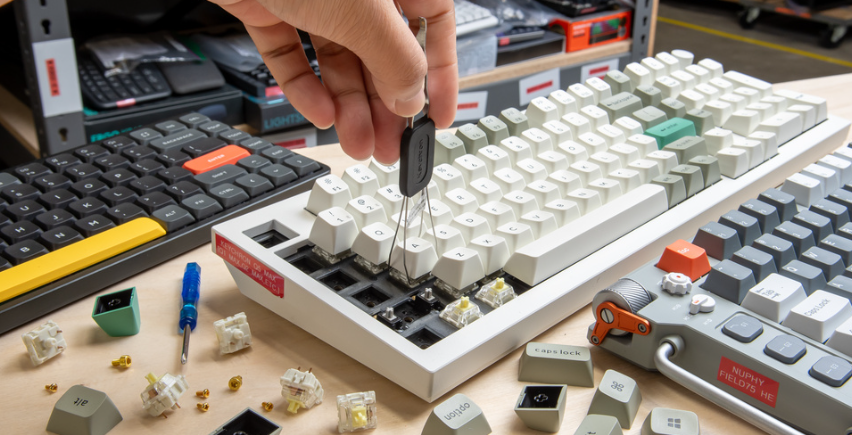
A 75 keyboard is also popular among mechanical keyboard communities because many models support modifications such as replacing switches, changing keycaps, and adjusting stabilizers to create a personalized typing experience.
How Does a 75 Keyboard Compare to Other Popular Keyboard Sizes?
Keyboard layouts are designed for different user preferences. Some people need maximum functionality, while others prefer a smaller and cleaner workspace.
| Keyboard Layout | Size | Advantages | Best For |
| Full-size | 100% | Includes all keys and number pad | Accounting, data entry, general office use |
| TKL | 80% | Keeps function and navigation keys | Gaming and professional work |
| 75 Keyboard | 75% | Compact while keeping important keys | Gaming, programming, daily use |
| 65 Keyboard | 65% | Smaller with arrow keys included | Portable setups |
| 60 Keyboard | 60% | Minimal design | Minimalists and custom keyboard enthusiasts |
A 75 keyboard sits between compact and traditional layouts. It provides many of the benefits of smaller keyboards while maintaining better accessibility.
75 Keyboard vs 60 Keyboard: Which Compact Layout Is Better?
A 60 keyboard focuses on maximum space efficiency. It removes the function row, arrow keys, and dedicated navigation buttons, creating a very small footprint.
While this design is attractive for users who prefer minimal setups, it requires more keyboard shortcuts. For example, accessing arrow keys or function keys often requires pressing additional key combinations.
A 75 keyboard is generally more convenient for users who frequently work with spreadsheets, programming tools, creative software, or productivity applications because important keys remain directly available.
75 Keyboard vs 65 Keyboard: What Are the Main Differences?
The main difference between a 75 keyboard and a 65 keyboard is the function row.
A 65 keyboard keeps the arrow keys but removes the F1-F12 row. This makes it smaller but less convenient for users who rely on function shortcuts.
A 75 keyboard provides additional flexibility by keeping these keys while maintaining a compact design. This makes it a popular choice for professionals who want portability without losing everyday functionality.
75 Keyboard vs TKL Keyboard: Which One Offers Better Functionality?
A TKL keyboard removes the numeric keypad but keeps the traditional spacing and navigation cluster. It is closer to a full-size keyboard in terms of layout.
A 75 keyboard offers similar functionality in a smaller footprint by reducing gaps between key groups. Users with limited desk space may prefer a 75 keyboard, while those who like traditional keyboard spacing may find TKL layouts more familiar.
What Makes a Good 75 Mechanical Keyboard?
A good 75 keyboard depends on more than just its size. Components such as switches, keycaps, build materials, and customization features all influence the overall experience.
For many users, the best keyboard is the one that matches their typing habits and daily requirements.
Which Mechanical Switches Are Best for a 75 Keyboard?
Mechanical switches determine the feeling, sound, and responsiveness of a keyboard.
The three most common switch categories are:
Linear switches: Smooth and consistent keystrokes, often preferred by gamers.
Tactile switches: Provide physical feedback during typing, popular among writers and programmers.
Clicky switches: Produce a noticeable clicking sound for users who enjoy audible feedback.
There is no universal best switch. A competitive gamer may prefer fast and smooth switches, while someone writing documents for several hours may prefer tactile feedback.
How Do Keycaps and Materials Affect a 75 Keyboard?
Keycaps influence both comfort and durability.
Most mechanical keyboards use either ABS or PBT keycaps. ABS keycaps often provide a smooth feel and are widely used, while PBT keycaps are generally more resistant to wear and are popular among enthusiasts.
The keyboard case material also affects the typing experience. Aluminum cases often provide a more solid feel, while plastic cases can make keyboards lighter and easier to carry.
Are Hot-Swappable and Customizable Features Important?
Customization is one of the reasons mechanical keyboards have become popular.
Many modern 75 keyboards include hot-swappable sockets, allowing users to replace switches without soldering. This makes it easier for beginners to test different switch types.
Other useful features include:
RGB lighting customization
Programmable keys
Wireless connectivity
Different mounting designs
Software support for key remapping
These options allow users to adjust the keyboard based on their personal preferences.
Is a 75 Keyboard Suitable for Gaming, Office Work, and Programming?
One of the biggest advantages of a 75 keyboard is versatility. It can support many different computing environments without being designed for only one type of user.
Why Do Gamers Prefer 75 Keyboards?
Many gamers choose 75 keyboards because they provide more space for mouse movement compared with larger keyboards.
In fast-paced games, especially FPS titles, additional desk space can help players position their mouse more comfortably. Gaming-focused 75 keyboards may also include features such as fast mechanical switches, RGB lighting, and programmable functions.
Can a 75 Keyboard Improve Typing Efficiency for Professionals?
For programmers, designers, and office workers, a 75 keyboard provides easy access to essential keys while keeping the workspace organized.
The function row is useful for software shortcuts, while dedicated arrow keys improve navigation when editing documents or writing code.
For professionals who spend many hours at a computer, choosing a comfortable keyboard layout can improve the overall working experience.
Who Should Consider Buying a 75 Keyboard?
A 75 keyboard may be a good option for:
Gamers who want more mouse space
Programmers who use shortcuts frequently
Office workers with limited desk space
Mechanical keyboard beginners
Users interested in customization
If you are looking for different compact mechanical keyboard options, you can explore our collection of 75 keyboard models designed for gaming, productivity, and everyday use.
How to Choose the Best 75 Keyboard for Your Needs?
Before purchasing a 75 keyboard, consider how you will use it most often.
For gaming, focus on switch response, build quality, and connectivity options.
For office work, quieter switches, comfortable keycaps, and reliable construction may be more important.
For enthusiasts, features such as hot-swappable switches, programmable layouts, and customization support can provide more long-term value.
Your operating system compatibility, desk space, and budget should also influence your decision. A well-designed keyboard that matches your workflow will usually provide a better experience than simply choosing the most expensive model.
Conclusion
A 75 keyboard offers an excellent balance between functionality and compact design. It keeps essential features such as function keys and arrow keys while reducing the size of traditional keyboards.
For gamers, it provides more room for mouse movement. For professionals, it maintains important productivity keys without taking up unnecessary desk space. For keyboard enthusiasts, it offers plenty of customization opportunities.
While different keyboard layouts serve different purposes, the 75 keyboard has become a popular choice because it provides a practical combination of comfort, efficiency, and flexibility.
FAQs
What is the difference between a 75 keyboard and a full-size keyboard?
A full-size keyboard includes a dedicated numeric keypad and more spacing between key groups. A 75 keyboard removes the number pad and creates a smaller layout while keeping essential keys such as the function row and arrow keys.
Is a 75 keyboard good for gaming and productivity?
Yes. A 75 keyboard can work well for both gaming and productivity because it provides important controls while saving desk space. The ideal choice depends on your preferred switches, features, and working style.
Should I buy a wired or wireless 75 mechanical keyboard?
A wired 75 mechanical keyboard is often preferred for gaming because it provides a stable connection. Wireless models are convenient for cleaner desk setups and flexible use. The right choice depends on whether you prioritize maximum reliability or portability.